
I’ve spent months testing Raspberry Pi kits, and honestly? Most bundles either nickel-and-dime you on essentials or overwhelm beginners with parts they’ll never touch.
The 2026 lineup finally strikes a better balance. Freenove packs 128 projects into one box, while CanaKit’s Pi 5 PRO ships with a preloaded 128GB card that actually works out of the box.
But here’s the thing: your perfect kit depends on whether you want to learn Python, build a home server, or just tinker without headaches.
So which one deserves your money?
Freenove Ultimate Starter Kit for Raspberry Pi (223 Items, 128 Projects)

5 sets of code: Python (compatible with 2&3), C, Java, Scratch and Processing (Scratch and Processing code provide graphical interfaces) Detailed tutorial: Can be downloaded...
You get sensors, modules, wires, the works. The 128 projects range from blinking an LED (boring but necessary) to building actual useful gadgets.
The 962-page tutorial comes as a digital download, no paper manual, which annoyed me until I realized I could search it on my phone mid-project.
Programming Options
Five code sets: Python, C, Java, Scratch, and Processing. Scratch and Processing give you drag-and-drop graphical interfaces, perfect when you’re tired of typing semicolons.
I stuck with Python mostly, but having options matters.
Compatibility
Works with basically every Pi ever made: 5, 400, 4B, all the way down to Zero models. Just remember, you’ll need to supply your own Raspberry Pi.
Verdict
For beginners who want depth without drowning, this kit delivers. The digital-only tutorial still bugs me, but the value’s undeniable.
Best For: Beginners who want comprehensive hands-on electronics learning with multiple programming options and project depth without being overwhelmed.
Pros:
- Extensive variety with 223 components and 128 projects ranging from basic to advanced, plus five programming language options including beginner-friendly Scratch and Processing
- 962-page digital tutorial is searchable and accessible on mobile devices during projects
- Broad compatibility across nearly all Raspberry Pi models from Pi 5 down to Zero variants
Cons:
- No paper tutorial included—digital-only format may frustrate users who prefer physical reference materials
- Raspberry Pi not included, requiring additional purchase to use the kit
- Digital tutorial initially feels like a drawback until users adapt to the searchable format
Recommended Products
5 sets of code: Python (compatible with 2&3), C, Java, Scratch and Processing (Scratch and Processing code provide graphical interfaces)

This sensor kit comes with 37 basic sensors and modules, which is good for learning basic knowledge about sensors. The main controller is Not Included.

SunFounder Raphael Ultimate Starter Kit for Raspberry Pi

The Raspberry Pi Raphael Starter Kit for Beginners: The kit offers a rich learning experience for beginners aged 10+. With 337+ components, 161 projects, and 70+ expert-led...
The SunFounder Raphael Ultimate Starter Kit is the one I’d hand to anyone who wants to learn by building, not just reading.
With 337+ components and 161 projects, this kit doesn’t mess around. You’re getting cameras, speakers, sensors, actuators, LEDs, LCDs, the works. Paul McWhorter’s 70+ video lessons walk you through everything, which beats squinting at blurry PDFs, right?
Here’s what stands out: five programming languages. Python, C, Java, Node.js, Scratch. Beginners aged 10+ can start with Scratch’s drag-and-drop blocks, then graduate to real code. I love that flexibility.
Compatibility? Covers Pi 5 down to Zero 2 W and the 400. RoHS compliant, though you’ll need to supply your own Pi.
The community forum actually responds, which matters when your LED won’t blink and you’re losing your mind at 2 AM.
Verdict: Perfect for visual learners who want variety without buying separate kits.
Best For: Visual learners aged 10+ who want hands-on experience with diverse hardware and gradual progression from block-based to text-based programming.
Pros:
- Extensive hardware variety with 337+ components enabling 161 projects without purchasing additional kits
- 70+ expert-led video tutorials by Paul McWhorter provide clear visual instruction superior to documentation
- Five supported programming languages (Python, C, Java, Node.js, Scratch) allow skill progression from beginner to advanced
Cons:
- Raspberry Pi not included, requiring separate purchase to use the kit
- Large component count may overwhelm absolute beginners despite age 10+ rating
Recommended Products

Includes Raspberry Pi 5 with 2.4Ghz 64-bit quad-core CPU (8GB RAM)

35+ Guided Electronics Projects: Progress from LEDs and buttons to RFID access, real-time clocks, motion and distance sensing, environmental monitoring, motor control and interactive displays for STEM learning, coding clubs and maker projects

The LAFVIN Ultimate Starter Kit for Pico is an all-in-one development kit tailored for both beginners and advanced developers. With over 450 high-quality components and more than 100 online project examples, it offers endless possibilities for your creativity.
CanaKit Raspberry Pi 5 Starter Kit PRO (128GB)
Includes Raspberry Pi 5 with 2.4Ghz 64-bit quad-core CPU (8GB RAM) Includes 128GB Micro SD Card pre-loaded with 64-bit Raspberry Pi OS, USB MicroSD Card Reader CanaKit...
Why settle for less when you’re diving into serious projects? The CanaKit Raspberry Pi 5 Starter Kit PRO gives you everything I wish I’d had starting out. You get the Pi 5 with 8GB RAM, which handles multitasking without breaking a sweat.
What stands out:
- 128GB pre-loaded SD card — no hunting for software
- Turbine case with real cooling — that low-noise bearing fan actually works
- 45W PD power supply — reliable juice, no random shutdowns
- Dual 4K display cables — because one screen feels cramped now
The Mega Heat Sink isn’t just marketing fluff. I’ve watched temps stay reasonable even under load. The black anodized finish looks sharp on a desk, too.
Who’s this for? Power users, media center builders, anyone tired of piecing together parts.
Verdict: Skip this if you’re pinching pennies. Grab it if you want to build today, not troubleshoot tomorrow.
Best For: Power users, media center builders, and anyone who wants a complete, ready-to-use Raspberry Pi 5 kit without the hassle of sourcing individual components.
Pros:
- 128GB pre-loaded SD card eliminates software setup time
- Effective cooling system with low-noise fan and Mega Heat Sink keeps temperatures reasonable under load
- 45W PD power supply provides reliable power without random shutdowns
Cons:
- 8GB RAM may be excessive for basic or beginner projects
- Includes redundant accessories (dual display cables) that not all users will need
Recommended Products
The Raspberry Pi Raphael Starter Kit for Beginners: The kit offers a rich learning experience for beginners aged 10+. With 337+ components, 161 projects, and 70+ expert-led video lessons, this kit makes learning Raspberry Pi programming and IoT engaging and accessible. Compatible with Raspberry Pi 5/4B/3B+/3B/Zero 2 W /400, RoHS Compliant

The Raspberry Pi Da Vinci Starter Kit for Beginners & Experts: The kit offers a rich learning experience for beginners aged 10+. With 300+ components, 150+ projects, and 70+ expert-led video lessons, this kit makes learning Raspberry Pi programming and IoT engaging and accessible. Compatible with Raspberry Pi 5/4B/3B+/3B/Zero 2 W /400(Not included Raspberry Pi)
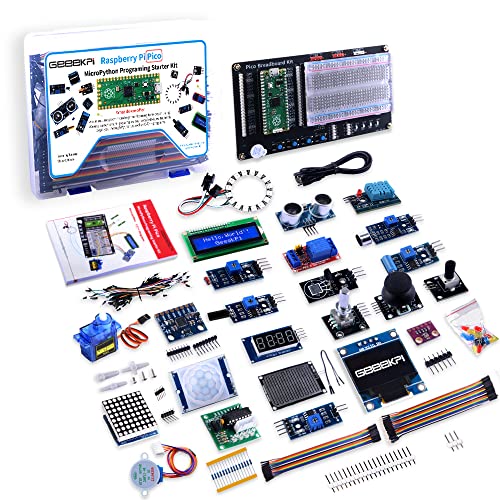
This complete kit comes with variety and quality of modules and components that you need compatible with raspberry pi pico.
LAFVIN Basic Starter Kit for Raspberry Pi Pico,LCD1602,SG90 with Tutorial

【RP2040 Development Platform】It uses the Raspberry Pi Pico development board and is equipped with the RP2040 microcontroller, making it suitable for e-learning,...
Looking for a kit that won’t overwhelm beginners but still teaches real skills? I found the LAFVIN Basic Starter Kit for Raspberry Pi Pico hits that sweet spot.
What’s Inside
You get the tiny Raspberry Pi Pico (built on the RP2040 chip), an LCD1602 display for showing text, and an SG90 servo motor for physical movement. That’s it. No fluff, no parts you’ll never touch.
Learning Approach
The tutorial includes actual code and step-by-step lessons. I appreciate that it covers three languages: MicroPython, C, and Piper Make.
Piper Make especially stands out for younger learners, it turns programming into visual blocks before tackling real syntax.
Real Talk
This kit focuses on fundamentals. You’ll wire components, write code, and see immediate results. The LCD shows your data; the servo spins on command. It’s satisfying.
Who’s It For?
Perfect for absolute beginners, kids included, who want tangible projects without complexity. Not for anyone needing wireless connectivity or heavy processing power.
Verdict: Start here, build confidence, then upgrade.
Best For: Absolute beginners and children who want to learn foundational programming and electronics skills through hands-on, tangible projects without overwhelming complexity.
Pros:
- Clean, focused component selection with no unnecessary parts that waste money or confuse learners
- Triple language support (MicroPython, C, Piper Make) grows with the user from visual blocks to real code
- Step-by-step tutorial with actual working code produces immediate, visible results that build confidence
Cons:
- No wireless connectivity limits project possibilities and IoT applications
- RP2040 processor lacks horsepower for demanding computational tasks
- Minimal component variety may require purchasing expansion kits sooner than expected
Recommended Products
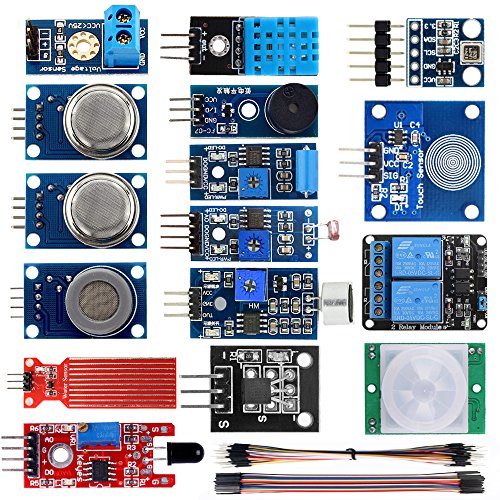
SMART HOME LEARNING KIT--This kit combines the most common electronic components of smart home projects,developed specially for those beginners who are interested in Arduino and raspberry pi DIY.
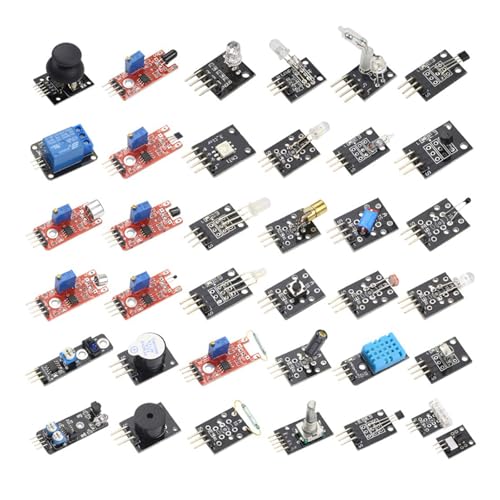
The 37 Sensors Assortment Kit comes as a comprehensive one - stop Starter Kit, providing a wide range of sensors in a single package.

Vilros Raspberry Pi 4 Complete Starter Kit (4GB)

Vilros Complete Starter Kit for Pi 4 Includes Raspberry Pi 4 Model B Board and all the accessories you need to get started. 9-PART KIT WILL HAVE YOU READY TO GET UP AND...
Need a kit that’s truly ready to go out of the box? The Vilros Raspberry Pi 4 Complete Starter Kit (4GB) delivers exactly that. I’ve unboxed plenty of Pi kits, and this one actually includes everything for a working computer, minus peripherals.
What’s Inside (and Why It Matters)
You get the Pi 4 board, a clear vented case with a pre-installed fan, four heatsinks with thermal stickers, and an inline power switch (trust me, you’ll use this constantly). The 64GB microSD card comes preloaded with Raspberry Pi OS, so no downloading, flashing, or head-scratching.
There’s also a 5-foot HDMI cable, USB adapter for re-flashing, a neoprene bag, and a Pi 4-optimized quickstart guide.
Cooling That Actually Works
The passive cooling through vents plus active fan means no throttling during everyday tasks. I’ve seen cheaper kits skimp here and regret it.
The Catch
No keyboard, mouse, or monitor included. You’ll need those separately.
Verdict: Perfect for beginners who want minimal setup friction, or anyone tired of hunting down compatible accessories. The 4GB RAM handles desktop work, media streaming, and light coding comfortably.
Best For: Beginners and experienced users who want a complete, hassle-free Raspberry Pi 4 setup with minimal assembly required and no need to source additional core components.
Pros:
- Truly ready-to-run kit with pre-loaded OS and essential accessories included, eliminating common setup headaches
- Effective dual cooling system with vented case and pre-installed fan prevents performance throttling
- Convenient inline power switch and clear case design for easy access and operation
Cons:
- No keyboard, mouse, or monitor included, requiring separate purchase of peripherals
- No option to choose different RAM configurations (locked at 4GB)
- Clear transparent case may show dust accumulation and lacks aesthetic color options
Recommended Products
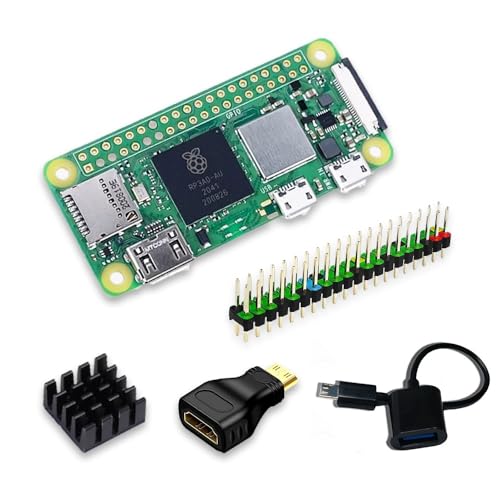
Powerful Performance: Equipped with a quad-core 64-bit ARM Cortex-A53 processor, the Raspberry Pi Zero 2 W delivers a significant performance boost compared to its predecessor. And built-in Wi-Fi and Bluetooth support enable easy wireless communication and Internet access for your projects, five Times Faster.

Aluminum Passive Cooling Case for Raspberry Pi Zero 2 w,solve the heat problem of you Pi Zero 2

Includes Raspberry Pi 4 4GB Model B with 1.5GHz 64-bit quad-core CPU (4GB RAM)
SunFounder AI Fusion Lab Kit for Raspberry Pi

All-in-One AI Learning Lab Powered by Raspberry Pi & Multi-LLMs. Turn Raspberry Pi (5 / 4B / 3B+ / 3B / Zero 2W) into a complete AI learning lab with support for multi-LLMs...
Who’s ready to build an AI assistant that actually sees and hears you? I’m genuinely excited about the SunFounder AI Fusion Lab Kit because it transforms your Raspberry Pi into something straight out of sci-fi.
What’s in the box: A Pan-Tilt HAT, 10-axis motion sensor, camera, and the Fusion HAT+ with built-in speaker and microphone. The hardware feels solid, not toy-like.
The AI smarts really shine. You’re not locked into one chatbot, either. I love that it plays nice with ChatGPT, Gemini, Grok, DeepSeek, Qwen, Doubao, and Ollama. Switch between them, compare responses, or run local models for privacy.
Learning curve: SunFounder partnered with educator Paul McWhorter for video lessons. The progression from Python basics to full AI projects actually makes sense. No gaps where you’re suddenly lost.
Real projects, real fun: Voice recognition, text-to-speech, YOLO object detection, OpenCV tracking. The Pan-Tilt HAT physically follows targets, so your Pi becomes an active observer, not just a passive camera.
My verdict: Skip this if you want plug-and-play simplicity. Grab it if you’re curious about multimodal AI and don’t mind some assembly. The documentation saves you from Stack Overflow rabbit holes, and the community actually responds.
Best For: Tinkerers, students, and AI enthusiasts who want hands-on experience building multimodal AI projects with Raspberry Pi and don’t mind some assembly.
Pros:
- Supports multiple LLMs including ChatGPT, Gemini, Grok, DeepSeek, Qwen, Doubao, and Ollama for flexibility and privacy options
- Comprehensive learning resources with structured curriculum and video lessons from educator Paul McWhorter
- Integrated hardware ecosystem with built-in audio, vision, and motion capabilities including Pan-Tilt HAT for active target tracking
Cons:
- Raspberry Pi not included, requiring separate purchase
- Not plug-and-play; requires assembly and technical setup
- Relies on community and documentation support rather than instant troubleshooting solutions
Recommended Products

**Wide Compatibility**: Supports Arduino series (R4 WiFi/Minima/R3/Mega 2560), and Raspberry Pi 5/4/3B+/3B/Zero, Raspberry Pi Pico W, ESP32, accommodating a broad range of development platforms. Contains 169 projects

386 items in total: This complete kit includes the most components, modules, sensors, wires and other items compatible with the Raspberry Pi (NOT included in this kit)

5 sets of code: Python (compatible with 2&3), C, Java, Scratch and Processing (Scratch and Processing code provide graphical interfaces)
Vilros Raspberry Pi 4 4GB Starter Kit with Fan-Cooled Case

KEEP YOUR PROCESSOR COOL: The busier a processor gets the more it heats up, leading to sub-optimal performance. To prevent this common issue, this kit includes an aluminum...
This kit’s active cooling setup makes it ideal if you’re planning to push your Pi 4 hard. The aluminum case comes with a pre-installed fan that actively dissipates heat, so you can actually stress-test this thing without throttling. I’ve seen too many Pis cook themselves in plastic boxes, this is different.
What’s Inside
You get the Pi 4 with 4GB RAM, which honestly feels like a real computer now. That’s laptop-grade memory for multitasking, retro gaming, even light desktop work.
The USB-C power supply includes a proper on/off switch, small thing, but you’ll appreciate not yanking cables.
The Catch
No SD card included. You’ll supply your own and flash it yourself.
Verdict
Great for tinkerers who want thermal headroom without building their own cooling solution. Media server, game emulation, security cam, this handles it. Just remember, that fan’s not silent.
Best For: Tinkerers and enthusiasts who want to push their Raspberry Pi 4 to its limits with demanding workloads like retro gaming, media servers, or security systems without worrying about thermal throttling.
Pros:
- Active cooling with pre-installed fan and aluminum case prevents overheating during heavy use
- 4GB RAM provides laptop-grade multitasking capability for desktop-like performance
- USB-C power supply includes convenient on/off switch for streamlined power control
Cons:
- No SD card included, requiring additional purchase and manual flashing
- Fan produces audible noise during operation
- Requires technical setup knowledge to prepare and configure the system from scratch
Recommended Products
Includes Raspberry Pi 5 with 2.4Ghz 64-bit quad-core CPU (4GB RAM)

The Super Starter Kit for Raspberry Pi offers detailed learning courses for beginners.

IoT Starter Kit for Beginners: The SunFounder Raspberry Pi Pico W Ultimate Starter Kit offers a rich IoT learning experience for beginners aged 8+. With 450+ components, 117 projects, and expert-led video lessons, this kit makes learning microcontroller programming and IoT engaging and accessible, RoHS Compliant
Factors to Consider When Choosing a Raspberry Pi Kit
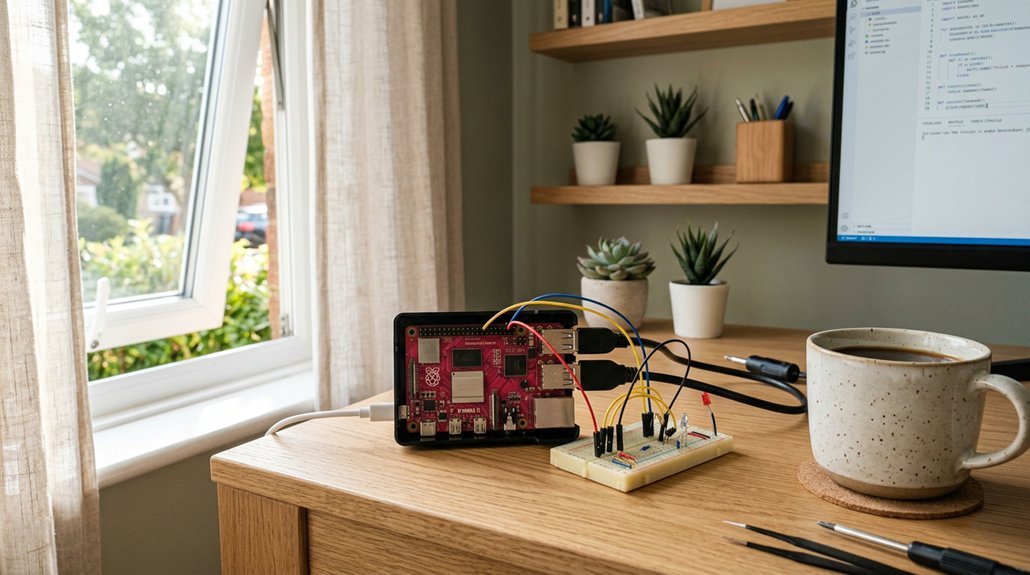
I’ll pick a kit that matches where I’m at, not where I wish I were. You’ll want to check what’s actually in the box, too, because some “starter” kits leave you hunting for cables or a proper power supply.
I’ve learned the hard way that future-proofing matters, so I always look for expansion options and honest pricing that won’t wreck my budget.
Recommended Products

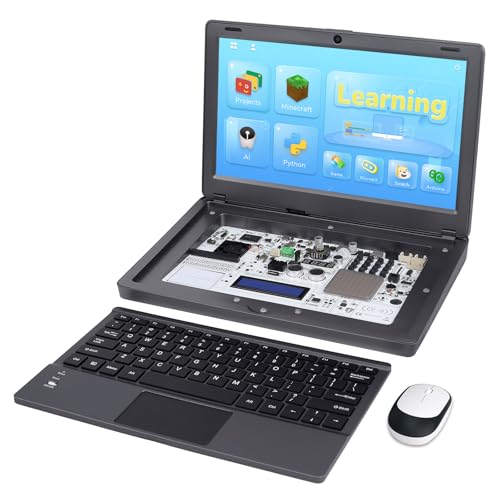
All-in-One Raspberry Pi Portable Laptop: CrowPi 2 is designed as a compact, portable laptop and an advanced STEAM education platform that integrates Raspberry Pi support, built-in sensors, and self-developed tutorial software — perfect for students, makers, and educators alike. (Raspberry Pi 5 not included)
Skill Level Match
Three things matter most when I’m picking a kit for myself or recommending one to you: where you’re starting, where you want to go, and how much hand-holding you’ll need along the way.
If you’re brand new, I look for Python and Scratch support, plus step-by-step wiring diagrams that don’t assume I already know my GPIO from my ground pin. Nothing kills momentum faster than cryptic instructions.
For advancing learners, I check project count and difficulty ramps. A kit promising 128+ projects with clear progression, like starter circuits building toward custom automation, keeps me engaged without overwhelming or boring me.
I also verify learning support: video tutorials, active forums, maybe Discord help. Coding alone at 2 AM with broken code and zero backup, that’s a special torture. Structured guidance matches my actual pace, not some theoretical ideal.
Advanced users need different validation: C, Java, Node.js compatibility, minimal tutorials, maximum flexibility. I won’t pay for hand-holding I’m not using.
Included Components
Once I’ve figured out whether a kit matches my skill level, I immediately start wondering what’s actually inside the box.
I want to see the essentials: the Pi board, a reliable power supply, and a case that actually fits. Beyond that, I’m looking for preloaded storage (64GB or 128GB microSD cards save me hours of frustration), plus the right cables, HDMI or micro HDMI, to get connected fast.
Cooling matters more than you’d think. A cheap case turns my Pi into a toaster; a turbine or fan-assisted enclosure keeps things smooth during heavy projects.
Sensors and modules? Give me variety. A kit boasting 337+ parts versus 161 projects tells me exactly how much room I’ll have to grow.
What’s missing often matters most. No display cables means another Amazon order. No camera or LCD options, and I’m stuck headless. I check the inventory list twice before clicking buy.
Learning Resources
A 962-page guide sounds like overkill until you’re three hours into troubleshooting a sensor that won’t blink. I’ve been there, and trust me, you want that documentation.
What to Look For
I prioritize kits with step-by-step tutorials, complete code, and wiring diagrams. Nothing beats having the exact code ready to copy when your LED refuses to light up.
Programming Flexibility
Multi-language support matters. Python’s great for beginners, but I like options: C for speed, Java for Android projects, even Scratch for kids. More pathways, more value.
Structure and Community
Organized projects with clear progression keep frustration low. Downloadable PDFs work fine if I lose the paper. And real support, whether expert videos or active forums, saves projects.
Skip kits with vague instructions. Your time’s worth more than guesswork.
Expansion Potential
Why settle for a kit that runs out of tricks after one project? I always check expansion potential before buying, because nobody wants to rebuy hardware six months later.
Look for I2C and SPI interfaces plus multiple GPIO headers. These let you stack sensors, cameras, and HATs without starting from scratch. More components and modular designs mean bigger projects down the road.
I prefer kits with broad programming support. Python’s great, but sometimes I need C++ or MicroPython for timing-critical hardware. Flexibility matters.
Documentation seals the deal for me. Wiring diagrams, schematics, and incremental project examples save hours of frustration. I once spent a weekend debugging a sensor that came with zero integration guides. Never again.
Pick a kit that grows with you.
Budget Alignment
Expansion potential matters, sure, but my wallet has opinions too. I always compare total kit price against what’s actually inside. Higher-priced sets usually pack more sensors and accessories than basic starter kits, so I ask myself: will I use them, or will they gather dust?
Storage matters. A 128GB microSD with preloaded OS saves hassle, but only if I need that space. I also count projects and tutorials. 128 versus 161 can mean months of learning or a dead end.
I check the power supply, cooling, and case quality at each price tier. Cheap cases crack; weak chargers fry boards. RoHS compliance, warranty, and brand reliability? They prevent headaches later. Sometimes spending $20 more now saves $50 in replacements.